Cluster Management Workflows for ThinkSystem Storage Manager, Version 9.6
This document is available in PDF format:
Cluster Management Workflows of ThinkSystem Storage Manager for DM Series, Version 9.6, PDF
- Workflows for ThinkSystem Storage Manager for DM Series
The workflow guide provides workflows for some of the new functions that are introduced in ThinkSystem Storage Manager for DM Series. - Setting up a cluster by using ThinkSystem Storage Manager for DM Series
You can use ThinkSystem Storage Manager for DM Series to set up the cluster automatically by using a template file, or manually by entering values in a guided setup. - Setting up the network
After the IPspace is created, you can use Storage Manager to set up the network for accessing data from storage virtual machines (SVMs) and managing SVMs. You must create a broadcast domain by using any type of port (VLANs, physical ports, or interface groups) and then create a subnet and a network interface. - Assigning disks to nodes
You can use Storage Manager to assign the ownership of unassigned disks to nodes to increase the size of the aggregates. - Managing FlexGroup volumes using Storage Manager
You can use Storage Manager to create FlexGroup volumes as per the best practices, or by manually selecting the aggregates. - Resizing FlexGroup volumes using Storage Manager
You can use Storage Manager to resize FlexGroup volumes by resizing the existing resources or adding new resources.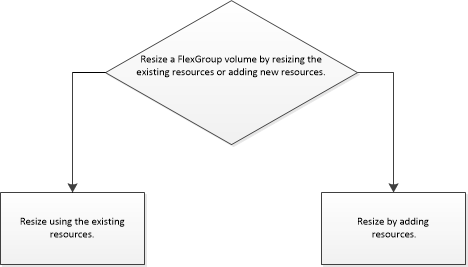
- Assigning disks to existing aggregates
You can increase the size of existing aggregates by adding disks (HDDs or SSDs) or increase the cache for existing Flash Pool aggregates by adding storage pools or dedicated SSDs (cache disks). - Provisioning cache through Flash Pool aggregates
You can provision cache by creating a Flash Pool aggregate or convert an existing aggregate to a Flash Pool aggregate by adding SSDs. You can create a new HDD aggregate (if one does not exist already) and add cache through dedicated SSDs or storage pools. - Providing data resiliency by mirroring aggregates
You can use Storage Manager to protect data and provide increased resiliency by mirroring data in real-time, within a single aggregate. Mirroring aggregates removes single points of failure when connecting to disks.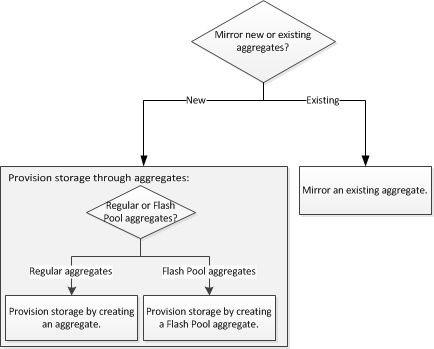
- Providing data access to qtrees using export policies
You can export a qtree by assigning an export policy to it. This enables you to export a specific qtree on a volume and make it directly accessible to clients instead of exporting the entire volume. - Configuring a Service Processor
You can configure a Service Processor to monitor and manage various system parameters of your storage systems. Configuring a Service Processor involves assigning IP addresses to all the Service Processors and modifying the settings. If required, you can assign IP addresses to the selected Service Processors. - Setting up a BranchCache configuration
You can configure BranchCache on a CIFS-enabled storage virtual machine (SVM) and enable BranchCache on the required shares to enable caching of content on computers local to requesting clients. - Protecting data using mirror and vault relationship
You can create a mirror and vault relationship using the MirrorVault policy to protect your data by periodically transferring data from the source volume to the destination volume. The relationship also enables you to retain data for long periods by creating backups of the source volume. - Protecting data using SnapLock
The SnapLock feature provides write once, read many (WORM) protection and a retention date to all files or data in the volumes that provides tamper-free backups. The SnapLock feature is most commonly used with unstructured data in the files on file systems. After the backup is complete, you can commit the backed-up files to WORM using a third-party application. - Contacting Support
You can contact Support to obtain help for your issue. - Notices
Lenovo may not offer the products, services, or features discussed in this document in all countries. Consult your local Lenovo representative for information on the products and services currently available in your area.
Give documentation feedback