Virtual Storage Console, VASA Provider, and Storage Replication Adapter for VMware® vSphere Workflow Guide
This document is available in PDF format:
- Deciding whether to use this guide
TheVirtual Storage Console (VSC), VASA Provider, and Storage Replication Adapter (SRA) Workflow Guide describes the workflows that can be executed based on the applications that you have deployed in your vCenter Server. - Workflow for deploying and configuring VSC, VASA Provider, and SRA
You can manage and monitor traditional datastores, virtual datastores, and the disaster recovery setup by using the virtual appliance for Virtual Storage Console (VSC), VASA Provider, and Storage Replication Adapter (SRA).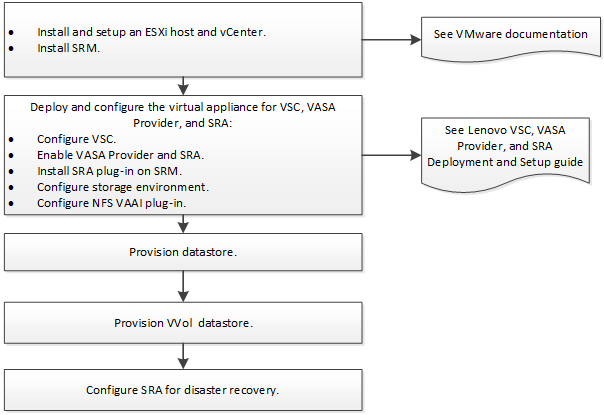
- Workflow for deploying and configuring VSC and VASA Provider
You can manage and monitor traditional datastores and virtual datastores by using the virtual appliance for Virtual Storage Console (VSC), VASA Provider, and Storage Replication Adapter (SRA). You must have deployed VSC and enabled VASA Provider to perform the tasks represented in the workflow.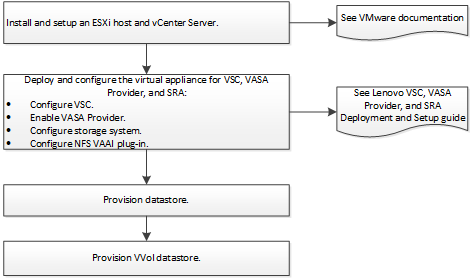
- Workflow for deploying and configuring VSC and SRA
You can manage and monitor traditional datastores and the disaster recovery setup by using the virtual appliance for Virtual Storage Console (VSC), VASA Provider, and Storage Replication Adapter (SRA). You must have deployed VSC and enabled SRA to perform the tasks in the workflow.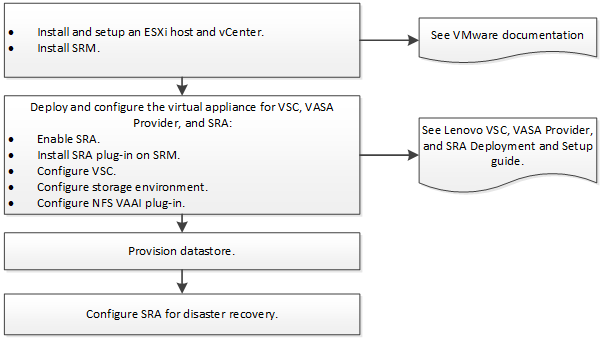
- Workflow for deploying and configuring VSC
You can manage and monitor traditional datastores by using the virtual appliance for Virtual Storage Console (VSC), VASA Provider, and Storage Replication Adapter (SRA). You must have VSC deployed to perform the tasks in the workflow.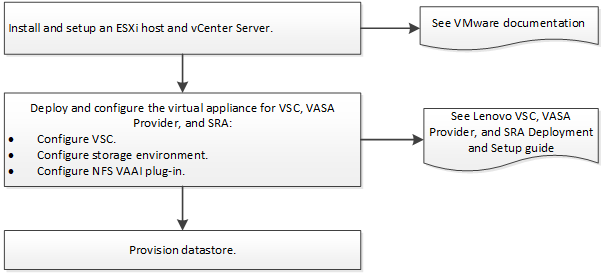
- Configuring datastores
You can use Virtual Storage Console (VSC) to configure datastores and virtual machines in your vCenter Server. The datastores and virtual machines that are provisioned by VSC are displayed on the dashboard of VSC, which enables you to easily monitor and manage these datastores and virtual machines. - Configuring virtual volume datastores
You can use VASA Provider for ONTAP to create and manage virtual volumes (VVols). You can provision, edit, mount, and delete a virtual datastore. You can also add storage to the datastore or remove storage from the virtual datastore. VVols provide greater flexibility. You can provision and manage every virtual machine and the related VMDK. - Configuring SRA for disaster recovery
After completing the initial Storage Replication Adapter (SRA) configuration, you must set up disaster recovery workflows that can be executed. - Contacting Support
You can contact Support to obtain help for your issue. - Notices
Lenovo may not offer the products, services, or features discussed in this document in all countries. Consult your local Lenovo representative for information on the products and services currently available in your area.
Give documentation feedback