Slot PCIe e adattatori PCIe
Questo argomento fornisce informazioni sulle regole di installazione per gli adattatori PCIe.
Configurazioni degli slot senza DWCM
Le seguenti tabelle riportano le configurazioni degli slot PCIe per ciascuna vista del server senza un modulo Modulo DWCM (Direct Water Cooling Module).
| Slot PCIe | ||||||
|---|---|---|---|---|---|---|
Figura 1. Vista posteriore con 8 slot PCIe  | ||||||
| Scheda verticale 1/2 | x16/x8/x8 (Gen 4/5) | x16/x16/E (Gen 4/5) | E/x16/x16 | Scheda verticale 3 | x16/x16 (Gen 4/5) | x8/x8 (Gen 4/5) |
| Slot 1/4 | PCIe x16 | PCIe x16 | Vuoto | Slot 7 | PCIe x16 | PCIe x8 |
| Slot 2/5 | PCIe x8 | PCIe x16 | PCIe x16 (Gen 4/5) | Slot 8 | PCIe x16 | PCIe x8 |
| Slot 3/6 | PCIe x8 | Vuoto | PCIe x16 (Gen 4) | |||
Figura 2. Vista posteriore con 10 slot PCIe 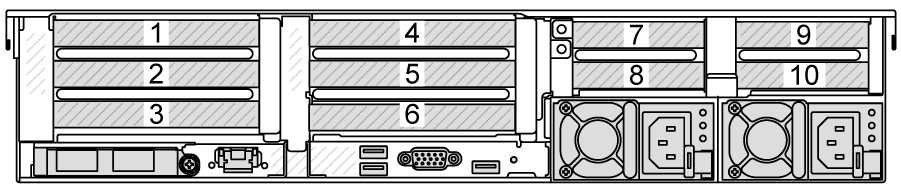 | ||||||
| Scheda verticale 1/2 | x16/x8/x8 (Gen 4/5) | x16/x16/E (Gen 4/5) | E/x16/x16 | Scheda verticale 3/4 | x16/x8 (Gen 4 per scheda verticale 3) | x16/x8 (Gen 5 per scheda verticale 4) |
| Slot 1/4 | PCIe x16 | PCIe x16 | Vuoto | Slot 7/9 | PCIe4 x8 | PCIe5 x8 |
| Slot 2/5 | PCIe x8 | PCIe x16 | PCIe x16 (Gen 4/5) | Slot 8/10 | PCIe4 x8 | PCIe5 x8 |
| Slot 3/6 | PCIe x8 | Vuoto | PCIe x16 (Gen 4) | |||
Figura 3. Vista posteriore con 6 slot PCIe 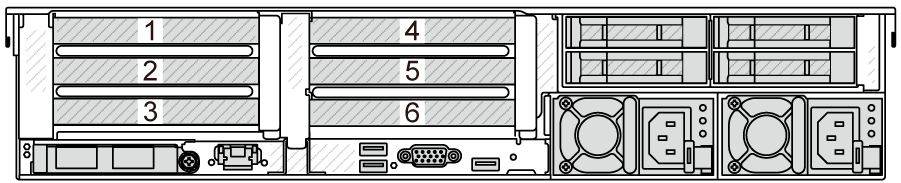 | ||||||
| Scheda verticale 1/2 | x16/x8/x8 (Gen 4/5) | x16/x16/E (Gen 4/5) | E/x16/x16 | |||
| Slot 1/4 | PCIe x16 | PCIe x16 | Vuoto | |||
| Slot 2/5 | PCIe x8 | PCIe x16 | PCIe x16 (Gen 4/5) | |||
| Slot 3/6 | PCIe x8 | Vuoto | PCIe x16 (Gen 4) | |||
Figura 4. Vista posteriore con 4 slot PCIe 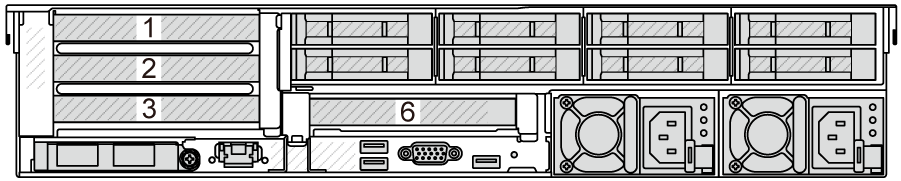  | ||||||
| Scheda verticale 1 | x16/x8/x8 (Gen 4/5) | x16/x16/E (Gen 4/5) | E/x16/x16 | Scheda verticale 2 | x16 (Gen 4) | |
| Slot 1 | PCIe x16 | PCIe x16 | Vuoto | Slot 6 | PCIe x16 | |
| Slot 2 | PCIe x8 | PCIe x16 | PCIe x16 (Gen 4/5) | |||
| Slot 3 | PCIe x8 | Vuoto | PCIe x16 (Gen 4) | |||
Figura 5. Vista posteriore con 2 slot PCIe 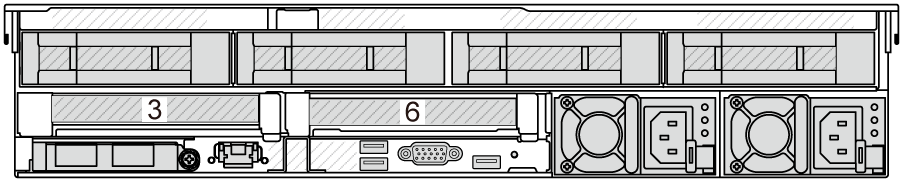 | ||||||
| Scheda verticale 1 | x16 (Gen 4) | Scheda verticale 2 | x16 (Gen 4) | |||
| Slot 3 | PCIe x16 | Slot 6 | PCIe x16 | |||
Figura 6. Vista anteriore con 2 slot PCIe  | ||||||
| Scheda verticale 5 | x16/x16 (Gen4) | |||||
| Slot 11 | PCIe x16 | |||||
| Slot 12 | PCIe x16 | |||||
Configurazioni degli slot con DWCM
Le seguenti tabelle riportano le configurazioni degli slot PCIe per ciascuna vista del server con un modulo DWCM.
| Slot PCIe | ||||||
|---|---|---|---|---|---|---|
Figura 7. Vista posteriore con 9 slot PCIe  | ||||||
| Scheda verticale 1/2 | x16/x8/x8 (Gen 4/5) | x16/x16/E (Gen 4/5) | E/x16/x16 | Scheda verticale 3/4 | x16/x8 (Gen 4 per scheda verticale 3) | x16/x8 (Gen 5 per scheda verticale 4) |
| Slot 1/4 | PCIe x16 | PCIe x16 | Vuoto | Slot 7/9 | PCIe4 x8 | PCIe5 x8 |
| Slot 2/5 | PCIe x8 | PCIe x16 | PCIe x16 (Gen 4/5) | Slot 8/10 | PCIe4 x8 | PCIe5 x8 |
| Slot 3 | PCIe x8 | Vuoto | PCIe x16 (Gen 4) | |||
Figura 8. Vista posteriore con 7 slot PCIe  | ||||||
| Scheda verticale 1/2 | x16/x8/x8 (Gen 4/5) | x16/x16/E (Gen 4/5) | E/x16/x16 | Scheda verticale 3 | x16/x16 (Gen 4/5) | x8/x8 (Gen 4/5) |
| Slot 1/4 | PCIe x16 | PCIe x16 | Vuoto | Slot 7 | PCIe x16 | PCIe x8 |
| Slot 2/5 | PCIe x8 | PCIe x16 | PCIe x16 (Gen 4/5) | Slot 8 | PCIe x16 | PCIe x8 |
| Slot 3 | PCIe x8 | Vuoto | PCIe x16 (Gen 4) | |||
Figura 9. Vista posteriore con 5 slot PCIe  | ||||||
| Scheda verticale 1/2 | x16/x8/x8 (Gen 4/5) | x16/x16/E (Gen 4/5) | E/x16/x16 | |||
| Slot 1/4 | PCIe x16 | PCIe x16 | Vuoto | |||
| Slot 2/5 | PCIe x8 | PCIe x16 | PCIe x16 (Gen 4/5) | |||
| Slot 3 | PCIe x8 | Vuoto | PCIe x16 (Gen 4) | |||
Figura 10. Vista posteriore con 3 slot PCIe   | ||||||
| Scheda verticale 1 | x16/x8/x8 (Gen 4/5) | x16/x16/E (Gen 4/5) | E/x16/x16 | |||
| Slot 1 | PCIe x16 | PCIe x16 | Vuoto | |||
| Slot 2 | PCIe x8 | PCIe x16 | PCIe x16 (Gen 4/5) | |||
| Slot 3 | PCIe x8 | Vuoto | PCIe x16 (Gen 4) | |||
Figura 11. Vista posteriore con 1 slot PCIe  | ||||||
| Scheda verticale 1 | x16 (Gen 4) | |||||
| Slot 3 | PCIe x16 | |||||
Le schede verticali Gen 4 supportano gli adattatori PCIe Gen 5 (eccetto le schede retimer Gen 5) e le schede verticali Gen 5 supportano gli adattatori PCIe Gen 4. Tuttavia si consiglia che la velocità dell'adattatore PCIe corrisponda a quella della scheda verticale per prestazioni ottimali.
Gli slot 2 e 5 sulla scheda verticale E/x16/x16 non supportano le schede retimer.
La scheda verticale 3 non è supportata su un server dotato di adattatore CFF e di due o tre backplane dell'unità anteriori NVMe/AnyBay a 8 vani da 2,5 pollici.
Adattatori PCIe supportati e priorità slot
Nella seguente tabella sono elencate le priorità di installazione consigliate degli slot per gli adattatori PCIe comuni.
| Adattatore PCIe | N. max. di adattatori supportati | Priorità slot consigliata |
|---|---|---|
| Adattatore GPU1 | ||
| GPU double-wide | 3 |
|
| GPU single-wide: T400, T1000 | 8 |
|
| GPU single-wide: A2 | 8 |
|
| GPU single-wide: L4, A400, A1000 | 8 |
|
| Adattatore DPU | ||
| ThinkSystem NVIDIA BlueField-3 VPI QSFP112 2P 200G PCIe Gen5 x16 | 2 |
|
ThinkSystem NVIDIA BlueField-2 25GbE SFP56 2-Port PCIe Ethernet DPU w/BMC & Crypto Nota Per i modelli compatibili e le condizioni di supporto di questo adattatore DPU, vedere BlueField-2 DPU supportin | 2 |
|
| Scheda retimer PCIe | ||
ThinkSystem PCIe Gen 4 x16 Retimer Adapter ThinkSystem SR630/SR650 V3 PCIe Gen 5 x16 Retimer Adapter | 4 |
|
| Adattatore di espansione RAID/HBA CFF interno | ||
5350-8i, 9350-8i, 9350-16i | 1 | Nessuna installazione negli slot PCIe. L'adattatore di espansione RAID/HBA CFF è supportato solo nello chassis del vano dell'unità da 2,5 pollici, che è installato tra il backplane anteriore e l'assieme della scheda di sistema. |
440-16i, 940-16i | ||
ThinkSystem 48 port 12Gb Internal Expander | ||
| Adattatore RAID/HBA SFF interno 2 | ||
4350-8i, 5350-8i | 4 |
|
4350-16i | 2 | |
440-8i, 540-8i, 940-8i, 9450-8i | 4 | |
440-16i, 540-16i, 940-16i, 9450-16i, 4450-16i, 5450-16i | 2 | |
940-32i | 1 | |
| 9350-8i | 4 |
|
| 9350-16i | 2 | |
| Adattatore RAID/HBA esterno | ||
440-8e, 440-16e | 12 |
|
450W-16e | 6 |
|
940-8e | 4 |
|
| Adattatore HBA FC | ||
| Tutti gli adattatori HBA FC supportati | 12 |
|
| Adattatore NIC | ||
ThinkSystem AMD X3522 10/25GbE DSFP28 2-port PCIe Ethernet Adapter | 6 |
|
ThinkSystem Broadcom 57504 10/25GbE SFP28 4-port PCIe Ethernet Adapter ThinkSystem Broadcom 57508 100GbE QSFP56 2-port PCIe 4 Ethernet Adapter V2 ThinkSystem Mellanox ConnectX-6 Dx 100GbE QSFP56 2-port PCIe Ethernet Adapter Mellanox MCX623106AC-CDAT Dx 100GbE QSFP56 2-port PCIe NIC -CSP I4 | 6 |
|
ThinkSystem Intel E810-DA4 10/25GbE SFP28 4-port PCIe Ethernet Adapter | 10 |
|
ThinkSystem Broadcom 57412 10GBASE-T 4-port PCIe Ethernet Adapter | 10 |
|
| Tutti gli altri adattatori NIC supportati | 12 |
|
| Adattatore InfiniBand | ||
Tutti gli adattatori IB supportati | 6 |
|
Regole per gli adattatori GPU:
Tutti gli adattatori GPU installati devono essere identici. Per il requisito termico sulle GPU, vedere Regole termiche.
I deflettori d'aria per gli adattatori GPU variano a seconda del tipo di GPU. Per informazioni dettagliate, vedere Sostituzione della GPU.
Se gli adattatori GPU sono installati, non sono supportati il telaio dell'unità centrale, il telaio dell'unità posteriore o le schede SSD PCIe.
Se sullo slot 2, 5 o 7 è installato un adattatore GPU double-wide, il rispettivo slot adiacente 1, 4 o 8 non è disponibile.
Quando sono installati tre o più adattatori RAID/HBA SFF, sono supportati solo due adattatori GPU double-wide al massimo.
I server dotati di adattatori GPU da 400 W non supportano ThinkSystem NVIDIA BlueField-3 VPI QSFP112 2P 200G PCIe Gen5 x16.
Le schede verticali Gen 5 non supportano i seguenti adattatori GPU: T400, T1000, A400 e A1000.
- Regole per gli adattatori RAID/HBA SFF interni:
Gli adattatori delle serie RAID 940/9350/9450 richiedono un modulo di alimentazione flash RAID.
L'adattatore RAID 940-8i o RAID 940-16i supporta l'opzione a tre modalità. Quando l'opzione a tre modalità è abilitata, il server supporta contemporaneamente le unità NVMe SAS, SATA e U.3. Le unità NVMe sono collegate tramite un collegamento PCIe x1 al controller.
NotaPer supportare le tre modalità con le unità NVMe U.3, lamodalità U.3 x1 deve essere abilitata per gli slot delle unità selezionati sul backplane tramite la GUI Web XCC. In caso contrario, le unità NVMe U.3 non possono essere rilevate. Per ulteriori informazioni, vedere L'unità NVMe U.3 può essere rilevata nella connessione NVMe, ma non a tre modalità. La chiave VROC (Virtual RAID on CPU) e l'opzione a tre modalità non sono supportate contemporaneamente.
I server dotati di adattatori GPU da 400 W non supportano ThinkSystem AMD X3522 10/25GbE DSFP28 2-port PCIe Ethernet Adapter.
L'adattatore HBA 450W-16e non può essere installato sullo slot 8 a causa della staffa.
ThinkSystem Broadcom 57412 10GBASE-T 4-port PCIe Ethernet Adapter è supportato solo su schede verticali Gen 4.