Known issues
The following are known issues for ThinkAgile MX Solution Builder Extension. The known issues listed in this section are grouped by SBE Version. Click on the SBE version you installed to view the known issues.
ThinkAgileMX 5.0.2605.1000
CAU fails to install drivers on ThinkAgileMX450EdgeIS due to WDAC blocking Miniunz utility
| SBE version | When updating to SBE version 5.0.2605.1000 ThinkAgileMX450EdgeIS |
| Issue description | When updating drivers through the SBE CAU interface on the node, CAU will fail to install the drivers. The CAU verbose logs will indicate that the process was blocked: “OneCLI reported error code 1. Generic Failure. The return code of option update is 191.” |
| Root cause | The issue is caused by the miniunz utility binary, which is part of the old driver PkgSDK included in the Lenovo driver Support Packages for ThinkAgile MX450 Edge IS. The utility binary no longer has an associated certificate and therefore cannot be recognized by the WDAC Code Integrity supplemental policy. When the driver package is extracted into the temporary directory, WDAC blocks this utility, preventing the driver from being updated. |
| Workaround | Please set WDAC policy mode to Audit before you start the SBE update: Once the SBE Update finishes successfully, please set it back as Enforced: |
| Fix | The Miniuniz utility is already replaced with a new library in the new Driver PkgSDK, so this issue will no longer occur in upcoming SBE releases. |
ThinkAgileMX 5.0.2512.1000
Get-NetAdapter for IBM USB Remote NDIS Network Device still shows ‘Not Present’ even after enabling Ethernet over USB XCC Setting
| SBE version | This known issue has currently been reproduced in a 23H2 environment |
| Issue description | After following the XCC prerequisite settings and enabled Ethernet over USB, calling Get-NetAdapter even after an OS reboot still shows the IBM NDIS network device as Not Present |
| Root cause | The root cause of this rare issue is unknown. |
| Workaround | Manually reset the device with the following script that invokes pnputil: |
| Fix | This rare issue has yet to get root caused to produce a fix at the moment. |
ThinkAgileMX 5.0.2512.1000
Microsoft Known Issue: SBE download fails on 12.2601.x initial release because ‘Assert-SBEResponseSchema’ is not recognized
| Azure Local version | After deploying or updating to 12.2601.1002.38 attempts to install an SBE where it is automatically downloaded (via SBE download connector feature) will fail. |
| Issue description | At the highest level, the attempt to install an SBE-only update will report DownloadFailed state in Get-SolutionUpdate output and if you investigate the details of that failure, you will see this as the underlying failure (perhaps as reported in the portal): “CloudEngine.Actions.InterfaceInvocationFailedException: Type 'SBEPartnerDownloadConnectorCheckHealth' of Role 'SBE' raised an exception: [SBEPartnerDownloadConnectorCheckHealth] SBE_xxx_xxxx_x.x.x.x download connector failure getting version 'x.x.x.x' files. The download connector health check failed. Exception Message: The term 'Assert-SBEResponseSchema' is not recognized as the name of a cmdlet, function, script file, or operable program. Check the spelling of the name, or if a path was included, verify that the path is correct and try again.” |
| Root cause | Azure Local 12.2601.1002.38 removed a deprecated helper module from the c:\Program Files\WindowsPowerShell\Module directory. This caused a regression in the SBE download action plan which had a dependency on the Assert-SBEResponseSchema method from that module being auto-imported. Without that method being available the download health check fails as per the exception above. This will be addressed in future Azure Local updates by refactoring the SBE download logic to no longer depend on this deprecated module. |
| Workaround | Depending on when you become aware of this known issue different mitigation options can be used. Choose the best option for your situation: Option 1 - Install any pending SBE updates BEFORE updating to 2601 Since this issue is introduced by the 12.2601.1002.38 update, the problem can be avoided by installing any available SBE updates first and then updating to Azure Local 2601 second. Since this issue will be addressed in the 12.2602 release, by installing the SBE first this will likely avoid this issue entirely (as it is unlikely that a new SBE update will be available prior to the availability of Azure Local 2602). Option 2 - Defer installing SBE updates until a version newer than 12.2601.1002.38 is released Microsoft intends to patch this issue in the next release. If Get-SolutionUpdateEnvironment reports the CurrentVersion is newer than 12.2601.1002.38 then you should be able to install SBE updates without experiencing the download failure. Option 3 - Avoid the download by importing the SBE If you are experiencing this issue and do not wish to wait for the next Azure Local release you can use Add-SolutionUpdate -SkipSbeVersionValidation to import the SBE after manually downloading the 3 SBE files from your hardware vendor. Once the SBE has been imported you should be able to start the SBE update as per the normal documented process. Note Refer to your hardware vendor SBE documentation for how to download and import your SBE. Microsoft describes the general process for importing, but some hardware vendors require additional steps (such as extracting the 3 SBE files from a larger bundle) and thus you should primarily refer to hardware vendor documentation for specific guidance. |
| Fix | Microsoft will resolve this issue in a future Azure Local release. For more information, please visit Microsoft’s post: https://github.com/Azure/AzureLocal-Supportability/blob/main/TSG/SolutionExtension/SBE-download-fails-Assert-SBEResponseSchema-not-recognized.md |
ThinkAgileMX 5.0.2512.1000
SBE update to 5.0.2512.1000 from older SBEs: OneCLI scanning may accidentally enter endless loop
| SBE version | The known issue is applied for the following SBE versions:
|
| Issue description | When upgrading from an earlier SBE package to SBE 5.0.2512.1000 on MX650V4 or MX630V4 systems, the CAU process on the first node may run for more than six hours before eventually failing |
| Root cause | A OneCLI bug during metadata scanning of the components lnvgy_fw_hpm_ihfg04n-4.26_anyos_comp and lnvgy_fw_dcscm_ihfs02n-2.44_anyos_comp causes the CAU scanning process to enter an endless loop |
| Workaround |
|
| Fix | Issue has been fixed in Lenovo SBE version 5.0.2601.1002 and later |

ThinkAgileMX 5.0.2512.1000
SBE Family migration to ‘ThinkAgileMX’ may prevent new updates from surfacing
| SBE version | The known issue is applied for the following SBE versions:
|
| Issue description | 23H2 environments that are still under SBE Families ‘ThinkAgileMXStandard’ and ‘ThinkAgileMXPremier’ may not see new updates like 24H2 solution updates and 5.0+ SBE updates  Example: All 23H2 updates have been installed (11.2510.1002.93 is last 23H2 solution update) and calling Get-SolutionUpdate doesn’t show any 12.*.*.* (24H2) solution updates. The last SBE update applied and shown is 4.2.2510.1005 and the 5.0 SBEs are not shown.  |
| Root cause | SBE Family difference is not properly recognized within the SBE Discovery Manifest |
| Workaround | Manually change the cluster’s SBE Family configuration by running the following two lines:
  Wait 10 minutes and then call Get-SolutionUpdate to see new updates Example: After changing the SBE Family (OemFamily) of the cluster, newer updates show after calling Get-SolutionUpdate:  |
| Fix | This issue will be patched in the upcoming release which will available by February 2026 at the latest |
Premier 4.2.2510.1000 / Standard 4.2.2510.1005
| SBE version | The known issue is applied for the following SBE versions:
|
| Issue description | BMC (XCC) IP for LAN over USB is not being automatically configured during pre-deployment stage causing lost comms issue via IBM NDIS network interface used during SBE Health Checks |
| Root cause | Even when manually assigned, the BMC IP for LAN over USB is not being resolved likely due to the storage NICs not having any IP addresses assigned during the pre-deployment stage. APIPA addresses are being assigned within the same subnet (255.255.0.0) leading to routing conflicts. |
| Workaround | Please follow the validation guidance in the Configure XCC section above to work around this issue. |
| Fix | We are working closely with Microsoft to mitigate this issue |
Premier 4.1.2505.1070 / Standard 4.1.2505.1065
| SBE version | The known issue is applied for the following SBE versions:
|
| Issue description | Test IBM USB Remote NDIS Network Device SBE Health Check has a bug that may result in failure when LAN over USB XCC setting is not enabled before deployment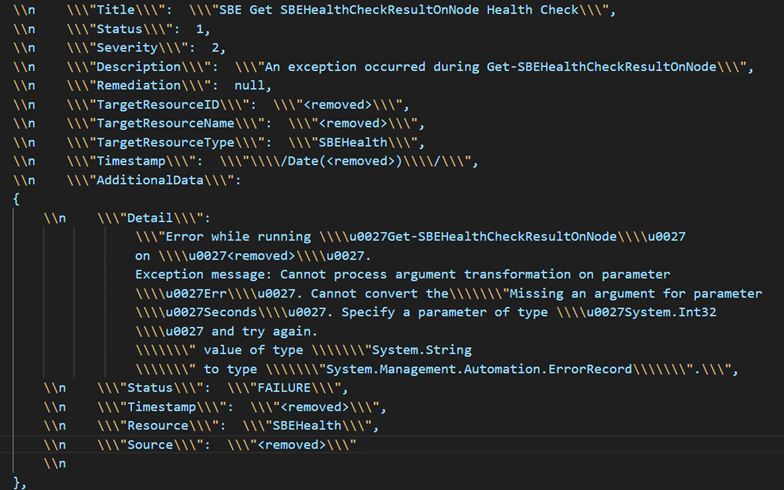 |
| Root cause | Improper wait timer set after trying to automatically enable the IBM USB NDIS device via pnputil scanning in the event that LAN over USB setting is not enabled before deployment |
| Workaround |
|
| Fix | Fixed in Solution Extension v4.1.2507.0/1, adopted in SBE 4.2.2508.1000/1005 |
| SBE version | The known issue is applied for the new deployments via Azure Portal starting in July 2025 |
| Issue description | A new Download Matrix Endpoint field may appear in the Configuration tab of new Azure Local deployments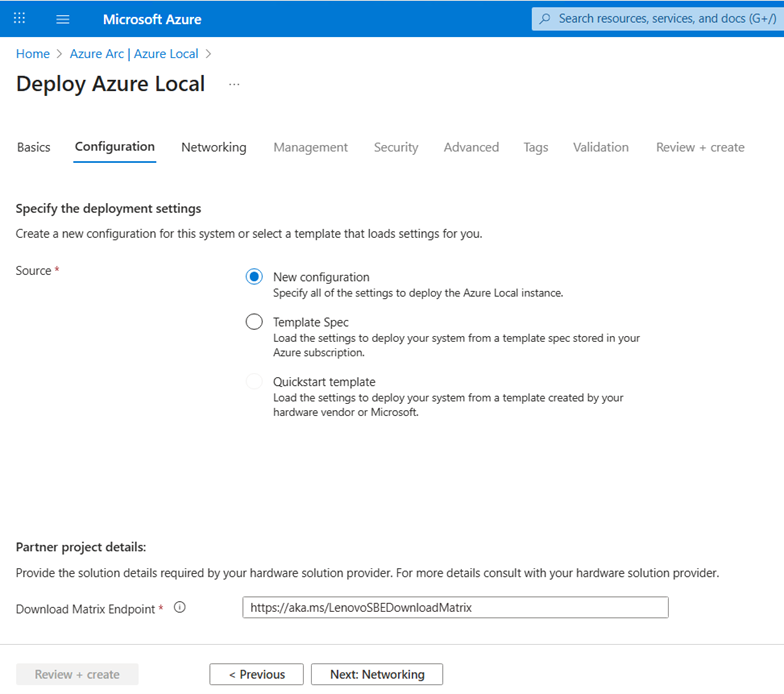 |
| Root cause | Working as designed. Please leave the Download Matrix Endpoint as the default https://aka.ms/LenovoSBEDownloadMatrix |
| Workaround | Working as designed. Please leave the Download Matrix Endpoint as the default https://aka.ms/LenovoSBEDownloadMatrix |
| Fix | This field may be removed from portal in the future to avoid customer confusion |
| SBE version | The known issue is applied for the following SBE versions:
|
| Issue Description | This is a known Intel E810 Windows driver issue documented in their v30.0.1 Release Notes: https://downloadmirror.intel.com/849481/Intel_Ethernet_Controller_Products_Release_Notes_30.0.1.pdf |
| Root cause | Installing Intel NIC E810 device driver v1.15.121.0 may cause crashes of vmswitch.sys in Azure Local cluster nodes |
| Workaround | Install Intel NIC E810 device driver v1.17.72.0 |
| Fix | MXBR2508 includes the v1.17.72.0 Intel NIC E810 device driver |
| SBE version | The known issue is applied for the following SBE versions:
|
| Issue Description | HBA driver update may cause disks to disappear because of needing a reboot after driver install for disks to return in single node environments |
| Root cause | SBE CAU plugin may fail when trying to write logs when CSV is inaccessible due disks missing before rebooting with lack of failover capability in a single node environment |
| Workaround | Perform reboot if safe for Azure Local cluster after updating HBA driver |
| Fix | Fixed in CAU plugin v5.1.1.0, adopted in SBE 4.2.2510.1000/1005 |
Premier 4.1.2501.1021 / Standard 4.1.2503.1002
| SBE version | The known issue is applied for the following SBE versions:
|
| Issue Description | This is a Microsoft known issue documented here: https://github.com/Azure/AzureLocal-Supportability/blob/main/TSG/Update/OS-update-automatically-set-to-run-on-3rd-Tuesday-following-SBE-update.md |
| Root cause | Prior to the 2505 release of Azure Local, the Solution Builder Extension (SBE) automation will remove the CauPluginName property from the CauClusterRole because the SBE uses a "custom" CAU plugin using the following syntax: Set-CauClusterRole -CauPluginName $null -Force This was previously considered a best practice (to remove traces of custom plugins that shouldn't be used outside of SBE updates). However, it had the unintended effect of adding the DaysOfWeek and WeeksOfMonth attributes to the CauClusterRole. This occurred because any call to Set-CauClusterRole will add those settings by default. |
| Workaround | For immediate mitigation, please follow the recommended instructions from Microsoft: https://github.com/Azure/AzureLocal-Supportability/blob/main/TSG/Update/OS-update-automatically-set-to-run-on-3rd-Tuesday-following-SBE-update.md#mitigation-details |
| Fix | The dependency on Set-CauClusterRole has been removed in Standard package 4.1.2505.1065 and Premier package 4.1.2505.1070 |
| SBE version | The known issue is applied for the following SBE versions:
|
| Issue Description | SBE CAU fails On Intel Chipset update when missing QAT utility installation on MX650 V3/630 V3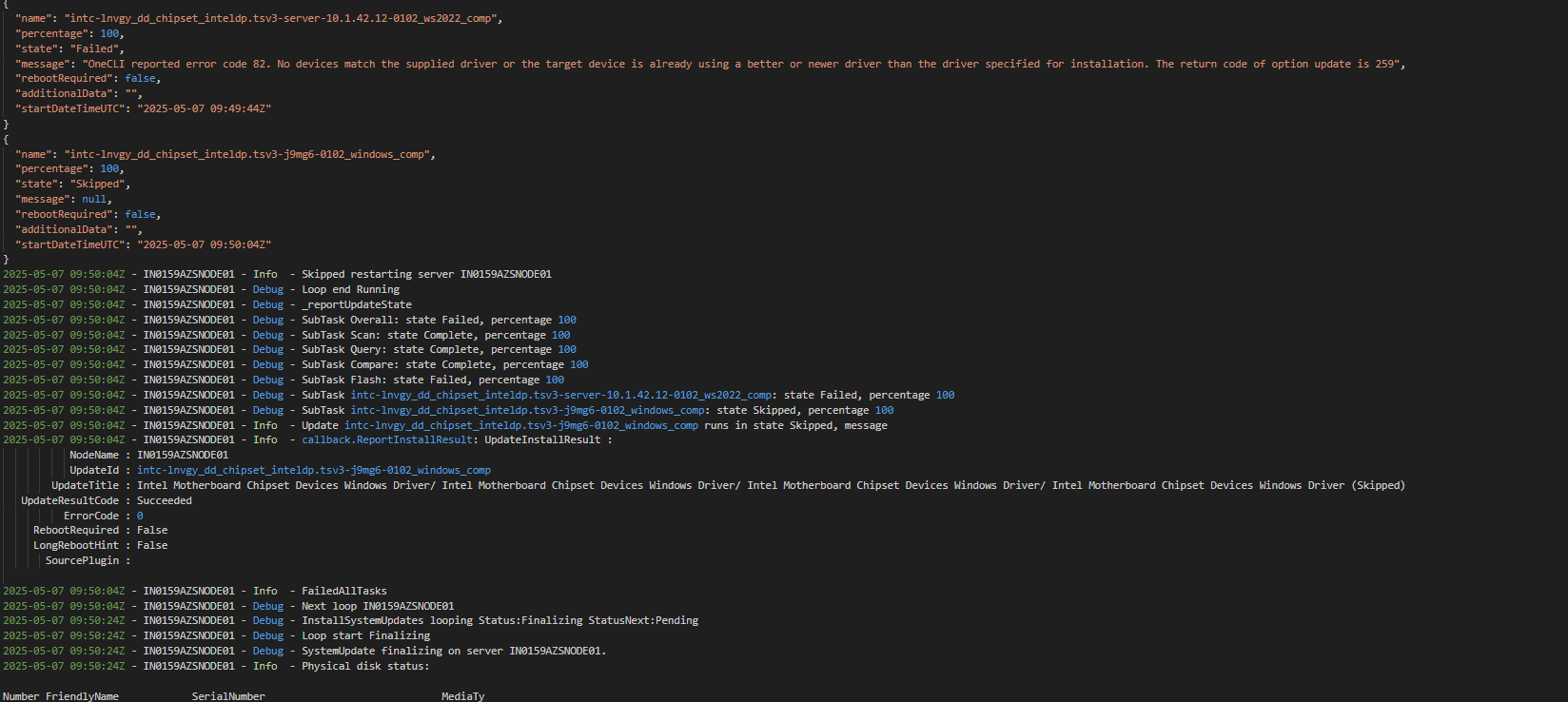 |
| Root cause | When customers re-image their servers on their own after receiving them from our factories, the systems will be missing necessary device drivers, notably the Intel QAT utility, that are built into the Lenovo OEM image with which our servers are shipped. |
| Workaround | If your Lenovo ThinkAgile MX servers were re-imaged and no longer contain the Lenovo OEM factory image, please manually install the QAT utility (intc-lnvgy_utl_chipset_inteldp.*.qat-*-*_windows_indiv) from our latest Best Recipe (https://support.lenovo.com/us/en/solutions/ht515442) before proceeding with SBE Updates. |
| Fix | This is working as designed for Lenovo ThinkAgile MX solutions that are shipped with the Lenovo OEM factory image. |
| SBE version | The known issue is applied for the following SBE versions:
|
| Issue Description | SBE solution update fails on the Test BMC Management IP Address Availability Health Check failure Health Check with the following error (example shown in screenshot below):
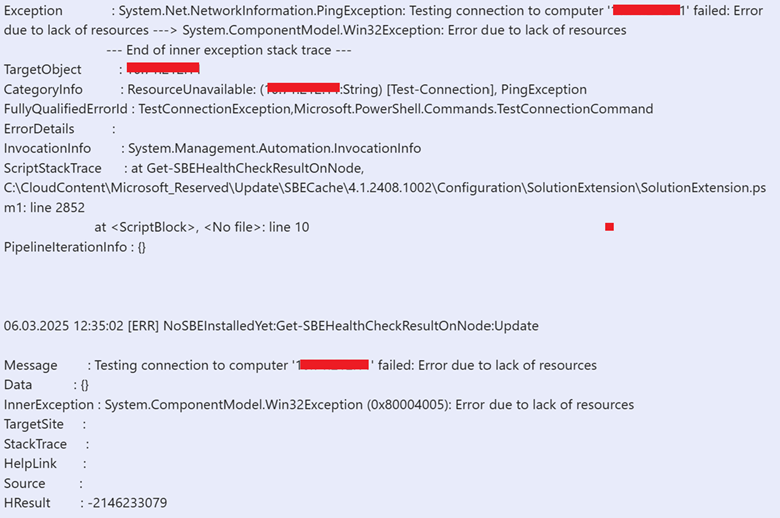 |
| Root cause | XCC External IP is not reachable from cluster management subnet. |
| Workaround | Temporarily allow inbound connections from the XCC IP address to the cluster management node through the firewall for the duration of the SBE update. |
| Fix | The dependency on XCC External IP has been mitigated in Standard package 4.1.2505.1065 and Premier package 4.1.2505.1070 |