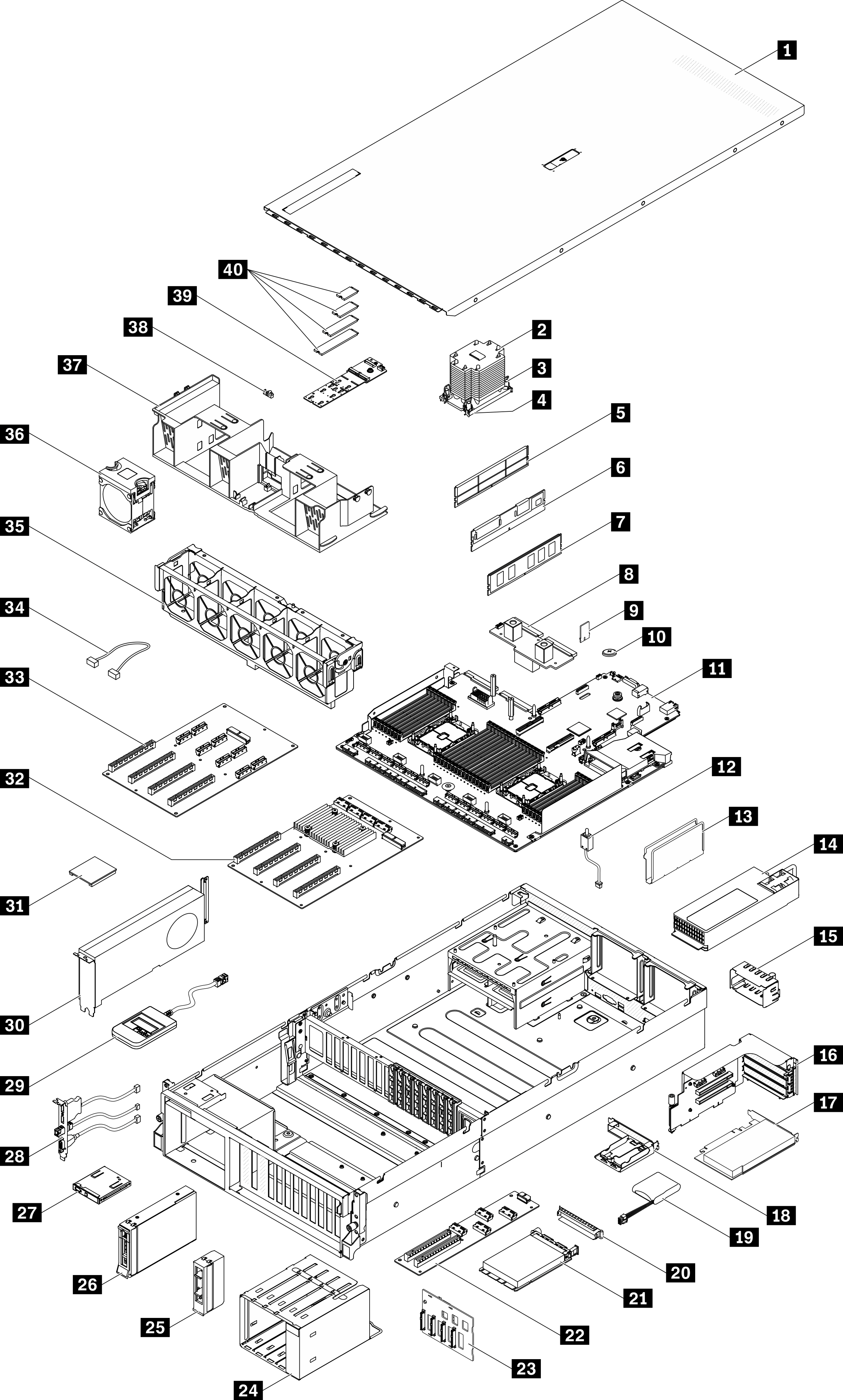
The 4-DW GPU Model (3.5-inch drive configuration) parts list
Use the parts list to identify each of the components that are available for your server.
Go to Parts list and navigate to the support page for your server.
Enter either the serial number or the machine type model for your server to see the parts for your server.
It is highly recommended that you check the power summary data for your server using Lenovo Capacity Planner before purchasing any new parts.
Tier 1 customer replaceable unit (CRU): Replacement of Tier 1 CRUs is your responsibility. If Lenovo installs a Tier 1 CRU at your request with no service agreement, you will be charged for the installation.
Tier 2 customer replaceable unit (CRU): You may install a Tier 2 CRU yourself or request Lenovo to install it, at no additional charge, under the type of warranty service that is designated for your server.
Field replaceable unit (FRU): FRUs must be installed only by trained service technicians.
Consumable and Structural parts: Purchase and replacement of consumable and structural parts (components, such as a cover or bezel) is your responsibility. If Lenovo acquires or installs a structural component at your request, you will be charged for the service.
| Index | Description | Tier 1 CRU | Tier 2 CRU | FRU | Consumable and Structural part |
|---|---|---|---|---|---|
For more information about ordering the parts shown in Figure 1:
It is highly recommended that you check the power summary data for your server using Lenovo Capacity Planner before purchasing any new parts. | |||||
| 1 | Top cover | √ | |||
| 2 | Processor heat sink | √ | |||
| 3 | Heat sink Torx T30 | √ | |||
| 4 | Processor | √ | |||
| 5 | DIMM filler | √ | |||
| 6 | Persistent Memory (PMEM) | √ | |||
| 7 | DRAM DIMM | √ | |||
| 8 | Power distribution board | √ | |||
| 9 | TPM card (Chinese Mainland only) | √ | |||
| 10 | CMOS battery (CR2032) | √ | |||
| 11 | System board | √ | |||
| 12 | Intrusion switch | √ | |||
| 13 | Cable guide | √ | |||
| 14 | Power supply unit | √ | |||
| 15 | Power supply unit filler | √ | |||
| 16 | PCIe riser cage with riser | √ | |||
| 17 | PCIe adapter | √ | |||
| 18 | Flash power module holder | √ | |||
| 19 | Flash power module | √ | |||
| 20 | OCP Ethernet adapter filler | √ | |||
| 21 | OCP Ethernet adapter | √ | |||
| 22 | Front I/O expansion board | √ | |||
| 23 | 3.5-inch drive backplane | √ | |||
| 24 | 3.5-inch drive cage | √ | |||
| 25 | 3.5-inch drive filler (1-bay) | √ | |||
| 26 | 3.5-inch hot-swap drive | √ | |||
| 27 | Front panel | √ | |||
| 28 | Front I/O module | √ | |||
| 29 | External LCD diagnostics handset | √ | |||
| 30 | Double-wide GPU | √ | |||
| 31 | GPU adapter link bridge | √ | |||
| 32 | Four PCIe x16 slot switched PCIe distribution board | √ | |||
| 33 | Four PCIe x16 slot PCIe distribution board | √ | |||
| 34 | Cable | √ | |||
| 35 | Fan cage | √ | |||
| 36 | Fan | √ | |||
| 37 | Air baffle | √ | |||
| 38 | M.2 drive retainer | √ | |||
| 39 | M.2 drive backplane | √ | |||
| 40 | M.2 drive | √ | |||