Processor and memory throttling problems
See this section to resolve issues related to processor and memory throttling.
System compatibility
WATER LOOP V2, SC750 V4
WATER LOOP V2 OP8500, SC750 V4
WATER LOOP V1-1, SC750 V4
Troubleshooting sections
Memory throttling
Collect the FFDC service data.
Contact Lenovo Product Engineer for further assistance.
Processor throttlingin system installed with single-side cooling memory modules
Single-side cooling memory module requires DIMM covers. For more information on distinguishing if memory modules are single-side cooling, seeInstall a memory module (single-side cooling) .
Make sure the water loop part “WATER LOOP V2 P300, SC750 V4” is at hand.
Check the packaging on the “WATER LOOP V2 P300, SC750 V4”. If the shipping date is more than two years ago, make sure processor thermal grease and water loop gap pads are at hand. For more information, see:
Make sure the inlet water temperature and water flow rate is within the standards specified in Environmental specifications.
Remove the water loop. Discard the water loop. Keep all the DIMM covers.
Check the packaging of the new water loop, “WATER LOOP V2 P300, SC750 V4”. If the shipping date is more than two years ago, complete the following steps:
Gently clean the old thermal grease and gap pads on water loop using an alcohol cleaning pad.
Re-grease the processor cold plate on the water loop.
Replace the gap pads with new ones.
Install the new water loop, WATER LOOP V2 P300, SC750 V4.
Reinstall the eight DIMM cover that were removed in Step 2.
If the problem persists, contact Lenovo support.
Processor throttling in system installed with dual-side cooling memory modules
Dual-side cooling memory module requires DIMM cooling bars. For more information on distinguishing if memory modules are dual-side cooling, see Install a memory module (dual-side cooling).
Make sure the following parts are at hand:
Water loop part “WATER LOOP V2 P300, SC750 V4”
Eight (8x) DIMM covers
Check the packaging on the “WATER LOOP V2 P300, SC750 V4”. If the shipping date is more than two years ago, make sure processor thermal grease and water loop gap pads are at hand. For more information, see:
Make sure the inlet water temperature and water flow rate is within the standards specified in Environmental specifications.
Remove the water loop. Discard the water loop and the sixteen (16x) DIMM cooling bars.
Check the packaging of the new water loop, “WATER LOOP V2 P300, SC750 V4”. If the shipping date is more than two years ago, complete the following steps:
Gently clean the old thermal grease and gap pads on water loop using an alcohol cleaning pad.
Re-grease the processor cold plate on the water loop.
Replace the gap pads with new ones.
Install the new water loop, WATER LOOP V2 P300, SC750 V4.
Install the DIMM covers as shown below, see Step 9 in Install a memory module (single-side cooling).
Figure 1. DIMM covers installation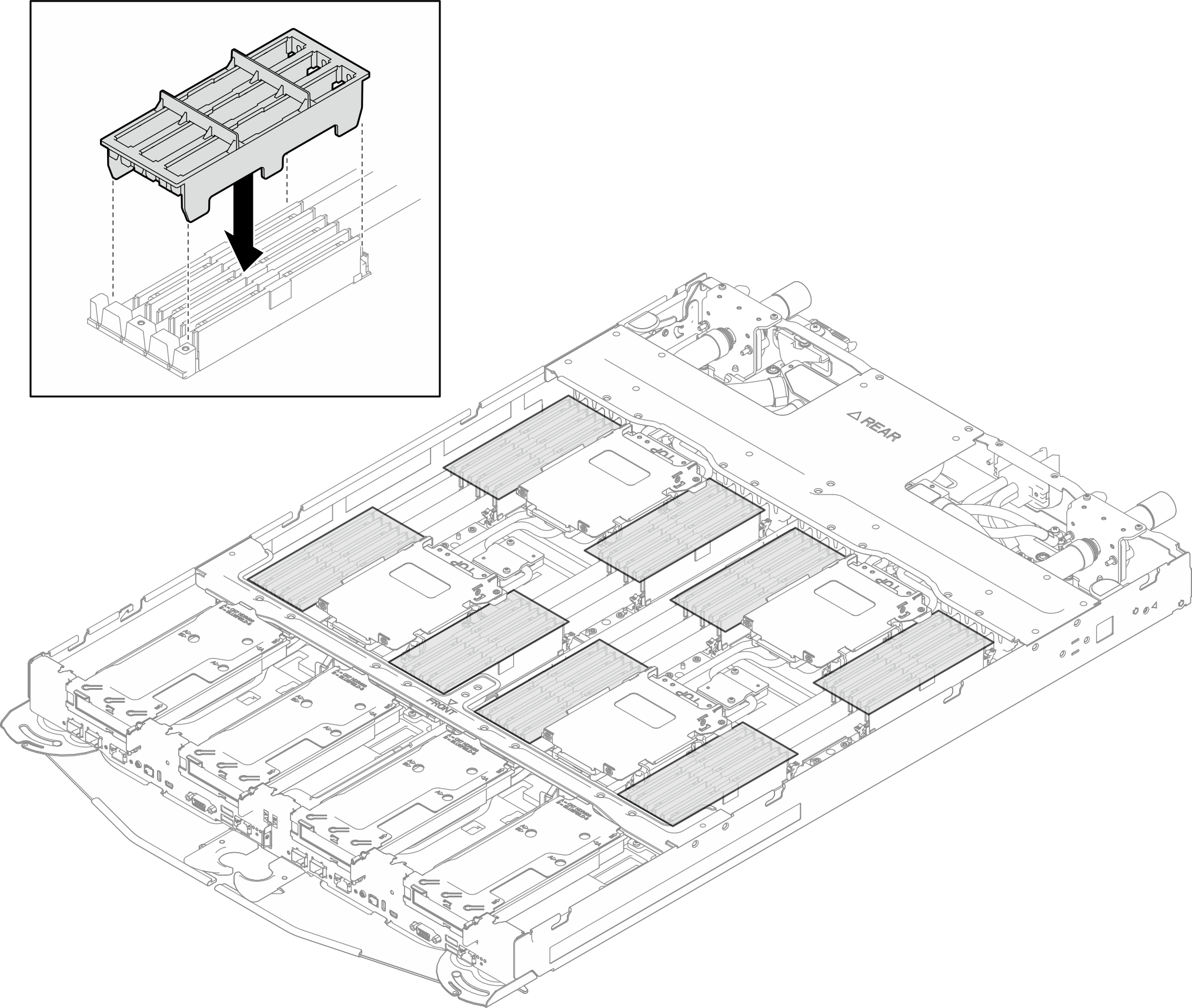
If the problem persists, contact Lenovo support.