CMM installation order (two processors)
This section provides the CMM installation order in configurations with two processors.
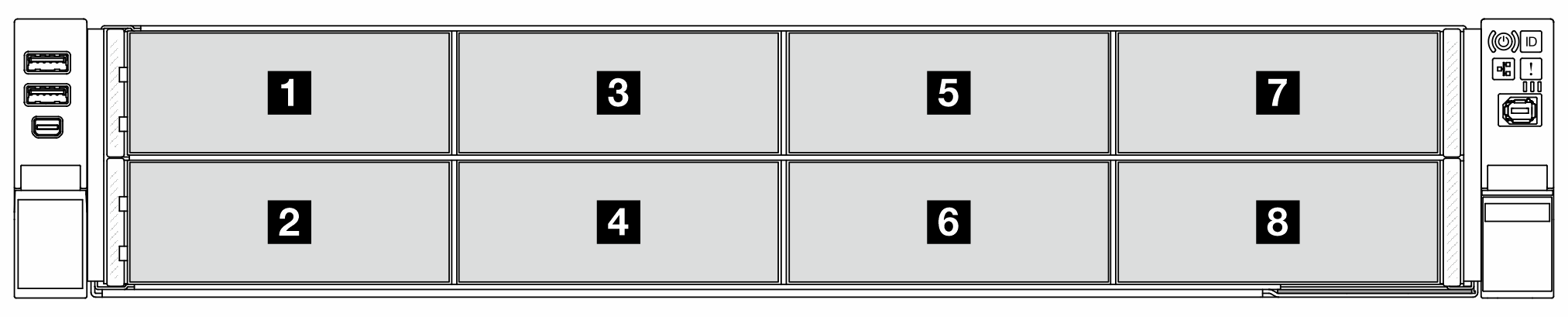
E3.S backplane installation order: BP1, BP5, BP3, BP7, BP2, BP6, BP4, BP8
Installation priority: E3.S 1T drive > E3.S 2T CMM.
When the CMM mode is 1LM+Vol, 4/8/12 CMMs are supported in configurations with two processors.
When the CMM mode is Hetero, 8 CMMs are supported in configurations with two processors.
| CMM quantity | BP1 | BP2 | BP3 | BP4 | BP5 | BP6 | BP7 | BP8 |
|---|---|---|---|---|---|---|---|---|
| 4 | 2x2T | 2x2T | ||||||
| 4 | 4x1T | 2x2T | 4x1T | 2x2T | ||||
| 4 | 4x1T | 2x2T | 4x1T | 4x1T | 2x2T | 4x1T | ||
| 4 | 4x1T | 4x1T | 4x1T | 2x2T | 4x1T | 4x1T | 4x1T | 2x2T |
| 8 | 2x2T | 2x2T | 2x2T | 2x2T | ||||
| 8 | 4x1T | 2x2T | 2x2T | 4x1T | 2x2T | 2x2T | ||
| 8 | 4x1T | 2x2T | 4x1T | 2x2T | 4x1T | 2x2T | 4x1T | 2x2T |
| 12 | 2x2T | 2x2T | 2x2T | 2x2T | 2x2T | 2x2T | ||
| 12 | 4x1T | 2x2T | 2x2T | 2x2T | 4x1T | 2x2T | 2x2T | 2x2T |
In the table above,
1T
denotes an E3.S hot-swap drive, and2T
denotes a non-hot-swap CXL memory (CMM).When upgrading E3.S drives/CMMs, make sure to follow the installation sequence provided in the table above.